आपकी वाणी . Books • Writers • Knowledge • Adhyatam

आपकी वाणी
19 C
Lucknow

₹0.00

No products in the cart.

MS Word for Pro Formatting

Using Sections in MS Word for Pro Formatting

In MS Word, settings like page numbers, headers/footers, and alignment are usually global. But what if you want different layouts in different parts of your book? The answer: Sections. With sections, you can apply unique formatting to each part reliably.
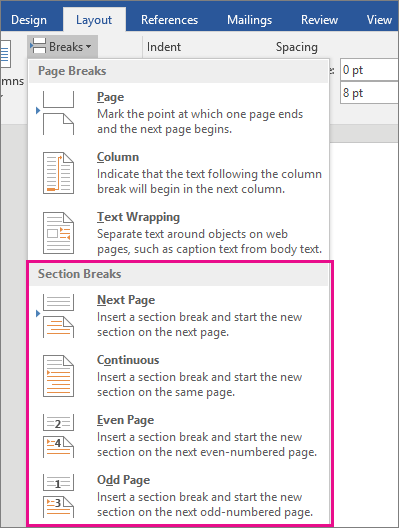
MS Word Section Break
Example: Inserting a Section Break (Next Page)

Different Page Numbering & Headers/Footers

If you want page numbers on some pages and not others—or different numbering styles—follow this process:

  1. After page 16, insert Section Break (Next Page).
  2. Insert a Blank Page (Page Break) on page 17–18.
  3. Insert another Section Break at end of page 18 for the next section.
  4. Double-click footer on pages 17–18 and turn off “Link to Previous”.
  5. Delete the page number from that section only—others remain unaffected.
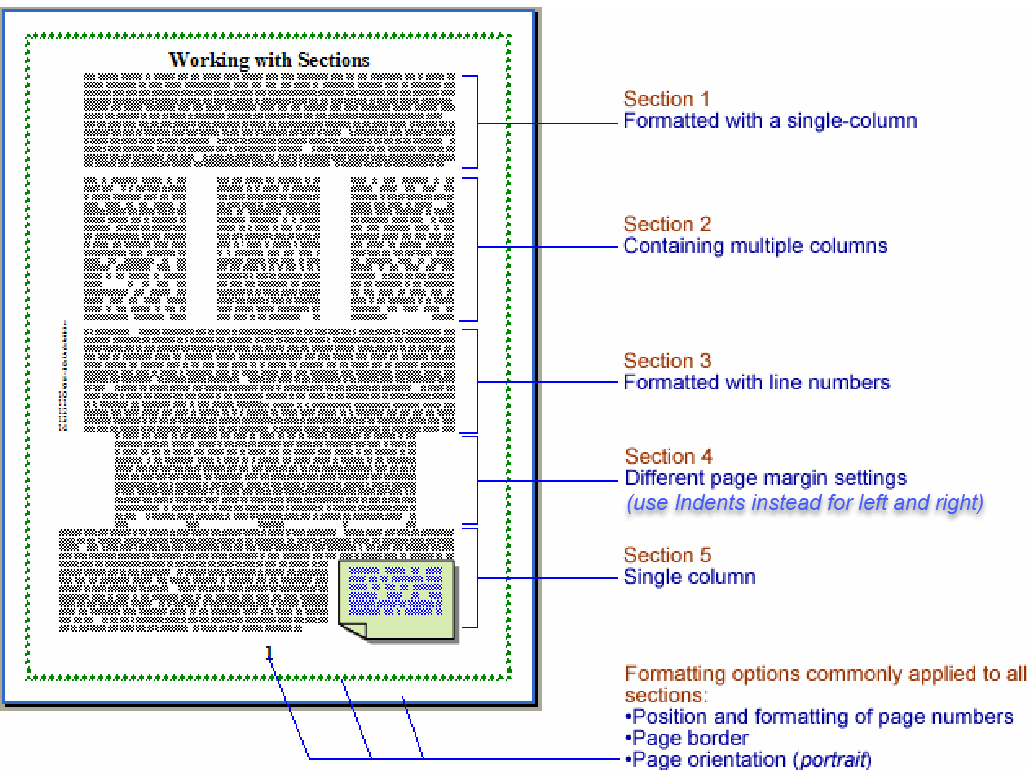
Word Page Number Styles
Different numbering styles and pages hidden via sections

Custom Chapter Headers or Footers

Want each chapter to have a different header/footer? Use sections:

  • Create a section at start of each chapter.
  • Disable Link to Previous for headers/footers.
  • Insert chapter-specific header or footer content.

Different Vertical Alignment

For chapter title pages, center-align the text vertically:

  1. Make that page a separate section.
  2. Go to Page Setup → Layout → Vertical Alignment → Center.
  3. Set Apply to: This Section.
Centered Chapter Title
Chapter heading vertically centered using section formatting

Conclusion

Sections give you precise control over formatting in different parts of a book—whether you need different page numbering, headers, footers, or layouts. Perfect for professional-quality formatting in Pustakvani self-publishing.

💡 Tip: Always check Show/Hide formatting marks (¶) to see and manage section breaks clearly in your Word document.

LEAVE A REPLY

Please enter your comment!
Please enter your name here

📚 CHECK OUT OUR OTHER AUTHOR SERVICES

Our publishing services help you put your best foot forward when self-publishing. Talk to us today to give your book the best chance of success.

More like this

Orkut to Whatsapp Image

Orkut to Whats App

Orkut किस-किस को याद है , या याद आ रहा है ......... आज अचानक कुछ पुरानी  स्मृतियाँ  सामने आ गयी उसमे कुछ स्क्रीन शॉट...

Upcoming Projects

Upcoming Project - Library for Readers ...
We don’t just print a book, we launch a voice of heart

We don’t just print a book, we launch a voice of heart.

We Don’t Just Print a Book, We Launch a Voice of HeartWhen you hold a book in your hands, you are not just touching...
हम किताबें क्यों नहीं बेचते, ज्ञान बेचते हैं

We don’t just sell the books, we deliver knowledge

We lend you lives you have never live beforeIntroduction: Beyond the Pages, Into the Soul“We don’t just sell the books, we deliver knowledge;...
Image for Publishing Proces

Learn Book Publishing Process

Learn Book Publishing ProcessBook publishing is an exciting journey that transforms an author's manuscript into a finished book ready for readers. The process begins...

Online Distribution Services

🌟 Extended Online Distribution Service - Pustakvani What is Extended Online Distribution? Extended Online Distribution is a premium...
spot_img

More like this

हम किताबें क्यों नहीं बेचते, ज्ञान बेचते हैं

We don’t just sell the books, we deliver knowledge

We lend you lives you have never live beforeIntroduction: Beyond the Pages, Into the Soul“We don’t just sell the books, we deliver knowledge;...
Image for Publishing Proces

Learn Book Publishing Process

Learn Book Publishing ProcessBook publishing is an exciting journey that transforms an author's manuscript into a finished book ready for readers. The process begins...

Online Distribution Services

🌟 Extended Online Distribution Service - Pustakvani What is Extended Online Distribution? Extended Online Distribution is a premium...